 ddot.it
 ⚇ ddot.it – Syntax Specification
This page summarises the syntax. The normative definition is the Parse Specification — where the two disagree, the Parse Specification wins. Related normative documents: the Vocabulary, Highlight and Autocomplete specifications.
Codepoints
Ddot.it syntax assumes newline normalisation:
- ‘CR LF’ -> NL;
- Single ‘LF’ -> NL;
- Single ‘CR’ -> NL.
| Name | Character | Code Point | Usage |
|---|---|---|---|
| Tab | \t | 9 | Whitespace |
| Newline | NL (LF, CR) | 10, 13 | Line separation |
| Space | ` ` | 32 | Whitespace |
| Exclamation mark | ! | 33 | Commands (!!) |
| Comma | , | 44 | Metadata |
| Dot | . | 46 | Triples |
| Semicolon | ; | 59 | Metadata pair separator |
Other Zs space | NBSP, NNBSP, … | 160, 8239, … | Whitespace |
Whitespace (WS) is Tab plus every Unicode space separator (category Zs) — space, NBSP (U+00A0), NARROW NO-BREAK SPACE (U+202F), IDEOGRAPHIC SPACE (U+3000) and the rest. They are accepted because they are visually indistinguishable from a space, so treating them as text would silently create a different node that looks identical. Zero-width characters (U+200B, U+FEFF) are category Cf, not Zs, and are ordinary text. See the Parse Specification.
Tokens
Symbol characters (., ,, ;, !) are grouped into maximal runs of the same character, and a run is a special token only at its special length:
| Token | Meaning | Regex |
|---|---|---|
DT2 | exactly two dots | (?<!\.)\.{2}(?!\.) |
DT4 | exactly four dots | (?<!\.)\.{4}(?!\.) |
CM2 | exactly two commas | (?<!,),{2}(?!,) |
SC2 | exactly two semicolons | (?<!;);{2}(?!;) |
EM2 | exactly two exclamation marks | (?<!!)!{2}(?!!) |
TX | everything else | — |
Every other run — a single ., three or five dots, a lone , — is ordinary text (TX). So Node.js, Mr. Smith and U.S.A. are plain values containing no operator.
Grammar
A document is simply a sequence of lines. There is no chunking construct: an omitted subject continues the subject of the previous line.
Snippet     := Line*

// Ordered choice: a Line is a Triple if one can be derived, otherwise NotATriple.
Line        := WS* Triple WS* NL
              | NotATriple NL

NotATriple  := (WS | DT2 | DT4 | CM2 | SC2 | EM2 | TX)*

DoubleDot   := WS* DT2 WS*
QuadDot     := WS* ( DT4 | DT2 WS+ DT2 ) WS*

Triple      := Subject?
               ( DoubleDot Relation DoubleDot | QuadDot )
               Object
               WS* Meta?

Subject     := TextExcept{NL,DT2,DT4}
Relation    := TextExcept{NL,DT2,DT4}
Object      := TextExcept{NL,CM2}
Subject?is optional: an omitted subject means continue with the subject of the previous line.Objectis mandatory and non-empty:a ..b..with nothing after the closing..is not a triple.QuadDotis the shorthand for an implicit relation:a....banda .. .. bboth meana ..links to.. b. The two spellings are the same operator, not two operators.- Whitespace is stripped from the start and end of every field, so
Dirk Hagemann .. works at .. Big Corpyields (Dirk Hagemann,works at,Big Corp). A field may contain spaces — only the operators delimit it.
Metadata
Meta              := CM2 WS* MetaInline WS*
                   | MetaBlockOpen NL (MetaBlock NL)? WS* CM2 WS*

MetaBlockOpen     := CM2 | NL WS* CM2

MetaInline        := ( MetaTripleInline (SC2 MetaTripleInline)* )
                   | MetaTextInline

MetaTripleInline  := DoubleDot MetaRelation DoubleDot MetaObjectInline
                   | QuadDot MetaObjectInline

MetaBlock         := MetaTripleInBlock (NL MetaTripleInBlock)*
                   | MetaTextBlock
;;separates inline metadata pairs:,, ..since.. 2025 ;; ..until.. 2027is two pairs. Inside a,,block a;;is ordinary text, because a block’s metadata object runs to the end of its line.- A metadata part holds either triples or free text, never both. Free text carries the built-in relation
text; the untyped,, .... valueform carrieslinks to. See the Vocabulary Specification.
Commands
A command has four interchangeable spellings, and the slash is required — bare ddot.it is a document marker, not a command:
command-begin := ( 'https://ddot.it/' | 'http://ddot.it/' | 'ddot.it/' | '!!' )
command       := command-begin command-name uri-query? uri-fragment?
command-name  := one or more characters that are not WS, NL, '?' or '#'
uri-query     := '?' then any characters up to WS, NL or '#'
uri-fragment  := '#' then any characters up to WS or NL
? and # do not terminate a command — they introduce its query and fragment, so !!block?end=EOS is one command. A command is part of the text of the field holding it, not a replacement for it.
See ddot.it/on, ddot.it/off, ddot.it/this and ddot.it/block.
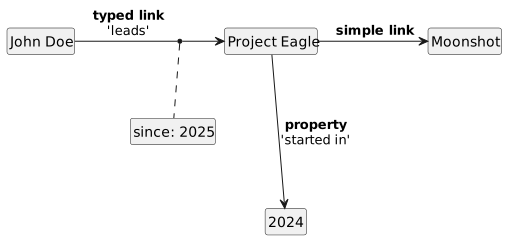
Syntax Example
Project Eagle..started in.. 2024
..doc site .. example.com/docbase/8dcjsid
John Doe..leads.. Project Eagle ,, ..since.. 2025
Project Eagle....Moonshot
This text is interpreted as this knowledge graph: