 ddot.it
⚇ ddot.it – Connect anything with everything
ddot.it is a simple syntax for mixing documents and knowledge graphs.
-
ddot.it uses only double-dot (
..) and double-comma (,,). -
Ergonomic: ⌨️ Easy to type, even on mobile keyboards.
-
AI ready: 🤖Token-efficient and Markdown-compatible.
-
ddot.it can be used wherever you can enter text.
-
Add links, annotations and structured data directly into your existing decentralized documents:
Markdown files, JavaDoc comments, Google Context notes field, PowerPoint slide notes, Confluence pages, Maven pom.xml files, Word documents, email text, Docker compose yaml files, web pages, … -
By using the same concepts, a single web of knowledge is formed – across tool boundaries.
-
You get an enterprise (or personal) knowledge graph, giving humans and agents a shared understanding of core concepts.
How does it work?
A uniform 'triple' structure for typed links, simple links, and properties.
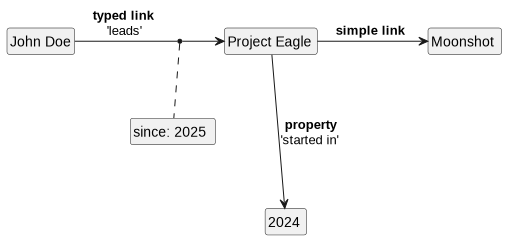
-
Each ddot reader knows how to read one kind of source and extracts the triples from the ddot.it text.
-
A ddot collector uses a number of readers to read all sources, periodically.
-
Your sources remain the single source of truth. Triples are just cached.
-
-
All triples are combined into a single knowledge base.
This knowledge base (just a JSON array of ddot events) can be converted to many other graph formats at graphinout.com.
Quick Ref
-
Universal typed link and property syntax is
aaa .. bbb.. ccc. -
Link type can be left out: Use
aaa …. cccfor a simple link. -
Append more to same subject with
..bbb.. ccclines. -
Meta-data can be appended behind
,,. -
Spaces and tabs don’t matter. Incomplete triples are ignored. An omitted subject continues the previous one — across blank lines, to the end of the file.
-
Annotate a document:
ddot.it/thisrefers to the doc in which ddot.it is used.
See the User Guide for the full syntax reference and more commands (ddot.it/COMMAND).
See the Developer Guide on how to implement your own readers and collectors.
Editor Support
-
Free VSCode extension on VSCode Marketplace and on Open VSX Registry
-
Free plugin for IntelliJ IDEA, IntelliJ IDEA Community, MPS, PhpStorm, JetBrains Gateway, GoLand, PyCharm, WebStorm, Code With Me Guest, Rider, PyCharm Community, CLion, DataSpell, RustRover, Android Studio, JetBrains Client, DataGrip, and RubyMine from Jetbrains Marketplace.
-
ddot textmate grammar on npmjs
-
ddot shiki language registration on npmjs
-
highlight.js language definition on npmjs
-
Prism.js language definition for ddot.it on npmjs
-
Rouge syntax highlighter on rubygems for Asciidoctor, Jekyll, GitLab
-
Pygments lexer for ddot.it on PyPI
Coding agent? See https://ddot.it/llms.txt