 ddot.it
 Ddot.it is a small language for knowledge graphs. It is meant to be used within existing files, which have their own structure and syntax. We call it the host language, where ddot.it is the guest language. Ddot.it has a generic triple model and a simple syntax. A gentle introduction can be found at ddot.it.
-
Last Modified: 2026-08-07
-
Version: 1.3.0
Introduction
-
What is the Purpose of ddot.it?
-
Where can I use it? Guest and Host Language
-
What can I express structurally with ddot.it? Information Model
-
How do I type ddot.it syntax? Syntax Concepts
Purpose
Ddot.it is meant to be spread over many files. Together, all these files should be parsed by a ddot.it parser, creating one large knowledge base. This knowledge base can interlink and describe concepts, and it can annotate the documents in which the ddot.it syntax has been typed. Crucially, ddot.it is meant to be typed alongside other content in another syntax. In fact, it has been designed specifically so that it coexists with other syntaxes: Markdown and AsciiDoc syntax have no meaning in ddot.it and also the other way round.
Guest and Host Language
-
Ddot.it can be used as a custom text format for representing knowledge graphs.
The vnd. facet is not decoration. In a media subtype the characters before the first . name a registration facet, so a bare text/ddot.it would parse as the undefined facet ddot, and the standards tree forbids faceted names outright. text/vnd.ddot.it is well-formed, keeps the ddot.it name, and is registerable by anyone interchanging these files. x-ddot is not an option: RFC 6648 deprecated the x- prefix, and RFC 6838 no longer treats such names as belonging to any tree. |
-
Ddot.it can be used as a guest language inside another host language or even a more complex host system. For example, ddot.it can be used within Markdown and AsciiDoc. In general, a host language SHOULD be parsed by a host-language aware parser. That parser SHOULD strip away host syntax for encoding host structures. For example,
## Foodefines a headline in Markdown, so onlyFooshould be given to the ddot.it parser.
Information Model
Ddot.it has a simple, triple-based information model.
-
Subject (S, about what are we stating facts),
-
Relation (abbreviated P after RDF property/predicate), and
-
Object (O, another objects name or a data value).
Additionally, a triple can have any number of attached Meta Relation (MR) and Meta Object (MO) pairs. This resembles RDF 1.2 / RDF-Star and provides a way to state facts about the triple.
A source provides 1 to n snippets. Each snippet is parsed. Unlike a programming language parser or Markdown parser, a ddot.it parser is not transforming its input, but extracting data from the input.
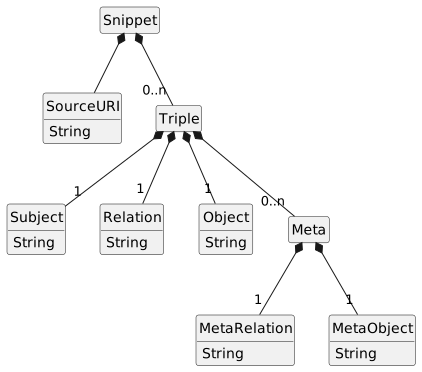
| Syntax vs. Information Model In the information model a Triple always has all three of Subject, Relation and Object. E.g. the AST shows
|
Triple Events
The information model above says what a triple is. This section says how a parser reports one. There is exactly one wire format, the triple event, and it is normative: an implementation conforms by emitting this JSON. Whitespace is optional.
Dirk ..works at.. SAP ,, ..since.. 2016
Claudia ..owns.. cat{
"from": "Dirk", "type": "works at", "to": "SAP",
"meta": [ {"type":"since", "to":"2016"} ],
"kind":"asciidoc", "source":"file:///~/Desktop/example.adoc", "location": 1
}
{
"from": "Claudia", "type": "owns", "to": "cat",
"kind":"asciidoc", "source":"file:///~/Desktop/example.adoc", "location": 2
}Syntax Concepts
Ddot.it tries to use few syntax elements, to make learning, reading and writing easy. The following syntax elements are used:
- Double dot (
..) -
It’s used for writing triples. This most fundamental syntax element, the double dot (ddot) is what gave ddot.it its name.
ExampleClaudia ..owns.. cat
- Whitespace
-
Space and tab are significant but never their exact amount. So ddot.it has a middle ground between 'whitespace is optional' (its not) and 'indentation level matters' (it doesn’t).
- Double comma (
,,) -
For appending meta data to a triple.
ExampleClaudia ..owns.. cat ,, ..since.. X-mas 2026
- Inline Form
-
Meta entries and the
,,are on the same line. - Block form
-
Meta entries follow on lines after
,,NEWLINE and are terminated by another,,on its own line. Meta blocks can freely mix text notes,..rel..object, and....object lines. Consecutive text lines are considered to be the same text note. A subject can hold any number of text notes, represented as (subject,text, text of note possibly including newlines).
- Double exclamation mark (
!!) -
For commands.
- Newlines
-
These are significant as they terminate a triple. A triple is recognised by its
../..markers, so ddot.it does not add a way to abort or continue a triple across a newline. The one place a newline is otherwise required — stating several (relation, object) pairs about one triple — has an inline substitute, the double semicolon. - Double semicolon (
;;) -
Used only inside a triple’s meta part (introduced by
,,), in the inline form, that is on the same line as the,,.- Design Rationale
-
-
To make "simple things simple and complex things possible", ddot.it needs a way to add multiple meta-entries to a triple even when newlines are not allowed (e.g. in HTML
data-ddotattributes) or not desired. - -
Also, a simple triple like
aaa ..bbb.. ccc ,, my noteshould be easily extended into a triple with even more metadata pairs without having to change the triple meta into block form. So we want to allowaaa ..bbb.. ccc ,, my note ;; ..foo.. bar ;; ..ppp.. qqq. -
To make (mental and technical) parsing simple, the double-semicolon separates meta-entries, which may be free-text,
..rel..object pairs, or....object pairs. -
Notes containing
;;can be written in meta-block form.
-
Syntax Shorthands
To avoid repeating the same subject over and over, ddot.it allows to omit it after the first line. So instead of
sss ..ppp1.. ooo1
sss ..ppp2.. ooo2
sss ..ppp3.. ooo3
one can write
sss ..ppp1.. ooo1
..ppp2.. ooo2
..ppp3.. ooo3
| There is no shorthand for expressing multiple objects for the same subject-relation combination. |
Commands
Commands extend ddot.it capabilities in various ways while keeping the extra syntax small.
All commands can be typed in several ways, which are interpreted identically:
-
https://ddot.it/COMMAND_NAME -
http://ddot.it/COMMAND_NAME -
ddot.it/COMMAND_NAME -
!!COMMAND_NAME
The !!COMMAND_NAME is easy to type, whereas the https://ddot.it/COMMAND_NAME is the most self-documenting version. In practice, ddot.it/COMMAND_NAME provides the best balance between readability and self-documenting. The expansion from !! could be done by editor plugins at typing time or ddot.it CLI tools. |
All commands are designed to be resolvable HTTPS URI (in their ddot.it/COMMAND_NAME form). Each URI resolves to a documentation page for the exact command. In the future, that page could even explain the interpretation of parameters. |
The following are two example URIs and their component parts:

         foo://example.com:8042/over/there?name=ferret#nose
         \_/   \______________/\_________/ \_________/ \__/
          |           |            |            |        |
       scheme     authority       path        query   fragment
          |   _____________________|__
         / \ /                        \
         urn:example:animal:ferret:nose
A ddot.it command thus consists of
-
command-begin := (
https://ddot.it/|http://ddot.it/|ddot.it/|!!) -
command := command-begin command-name uri-query? uri-fragment?
-
command-name := one or more characters that are not
WS,NL,?or
(the name stops at?/; the command does not — see below) -
uri-query :=
?then any characters up toWS,NLor# -
uri-fragment :=
#then any characters up toWSorNL
Commands fall into two groups by when they act:
- Special Pre-Parse Commands
-
These three commands must be respected at the ddot.it parser level:
!!off,!!on, and!!block. - Regular In-Text Commands
-
!!this, and any otherddot.it/<name>.
!!label was an in-text command in earlier versions of ddot.it. It is retired: label is now an ordinary relation (foo ..label.. bar), defined in the Vocabulary Specification. This changes nothing at the syntax level — see Spec. |
Pre-Parse Commands
They are recognised while a chunk is split into snippets, before the snippet grammar runs. They decide which text is parsed (!!off/!!on) or taken verbatim (!!block), and so never appear as nodes in the AST.
A host-aware parser is a different matter. If an AsciiDoc-aware ddot.it parser strips // comment lines before handing text over, the commands inside them never arrive. Steering that relies on comments therefore works with a plain ddot.it parser reading the raw file, and a host-aware parser SHOULD preserve pre-parse commands it finds in host comments rather than discarding them. |
Command !!off
Ddot.it has no comments in its syntax. But only conforming lines are interpreted as triples. To explicitly exclude certain lines from interpretation — effectively like a block comment — ddot.it provides ddot.it/off and ddot.it/on commands.
This command, like all commands, is not active when inside a Command !!block. |
Command !!on
This command, like all commands, is not active when inside a Command !!block. |
See also: The !!off command.
Command !!block
JSON, for example, allows to type foo\"bar to effectively have a single double quote in the string between foo and bar and get foo"bar as a value. In ddot.it, quotes don’t need to be escaped, as they carry no semantics in the syntax. Other character sequences, such as .., ,,, ;;, !! or newlines cannot be used everywhere.
Ddot.it has no escape syntax. Instead, ddot.it provides a !!block command. The block command allows almost any character to be put verbatim into ddot.it, without interpreting it. By default, a !!block ends with the first blank line, but a custom end marker line can be defined.
John ..address.. !!block
1 Broad Way
Lower Manhatten
..No !!command has an effect here..
U.S.A.

Dirk ..works at.. SAPJohn ..address.. !!block?end=END
1 Broad Way
 Lower Manhatten
 ..No !!command has an effect here..
 U.S.A.
END
Dirk ..works at.. SAP-
S=
John, P=address, O=1 Broad Way
Lower Manhatten
..No !!command has an effect here..
U.S.A. -
S=
Dirk, P=works at, O=SAP
!!block in other fields!!block?end=EOS
../../notes.adoc
EOS
..has type.. relative path
water ..formula.. H2O ,, ..note.. !!block
solid, liquid, gas -- all three
phases occur naturally
Dirk ..works at.. SAP-
S=
../../notes.adoc, P=has type, O=relative path
(a subject containing..— impossible to type directly, sinceSubjectexcludesDT2. The..has type..line continues the logical line after theEOSterminator.) -
S=
water, P=formula, O=H2O, Meta:note=solid, liquid, gas — all three
phases occur naturally -
S=
Dirk, P=works at, O=SAP— a fresh line: plain text cannot continue the completedwatertriple.
This shows the difference between syntax and information model. In the information model every field value may contain newlines, .., ,,, and other otherwise-special sequences. At the syntax level those cannot be typed directly into their field (Object := TextExcept{NL,CM2}, Subject := TextExcept{NL,DT2,DT4}, …); the !!block wrapper is what puts them there verbatim. A subject containing .., for instance, can only be written via !!block. |
The ?end= Parameter
!!block takes one optional command parameter, end, naming the line that closes the block. It is an ordinary URI query, so all four command spellings accept it: !!block?end=END, ddot.it/block?end=END, and the http(s):// forms.
The marker appears twice and both occurrences are tagged block-end, which is what visually pairs an opener with its terminator:
john ..address.. !!block?end=END
                 ^^^^^^^ ^^^^^ ^^^
                 command  |    block-end   (the marker in the opener)
                          command-param
1 Broad Way

still inside: a blank line does not close a marked block
END
^^^                                        block-end   (the terminator line)
Dirk ..works at.. SAP
!!block is a pre-parse command, so none of this appears in the AST: by the time the snippet grammar runs, the block’s lines have already become the value of the position the opener fills (any of the four). That is why the grammar has no production for it, and why the highlighter treats the body as its own verbatim region rather than as field content. See the golden corpus: 17-block (blank-line form) and 21-block-end-marker (marked form).
The golden corpus pins three of the four opener positions: 17-block and 21-block-end-marker (Object, both terminator forms), 29-block-subject (Subject, with a DT2 continuation line) and 30-block-meta-object (MetaObject). The meta text position has no case yet; one should be added. |
See also https://ddot.it/block.
In-Text Commands
They occur inside a triple field and are part of that field’s text (see Abstract Syntax Tree). A strict source-to-source tool leaves them untouched; interpreting tools give them their meaning.
A ddot.it parser can ignore these commands. They are handled by higher layers interpreting the triple+meta stream. New commands can be used without changing this part of the spec.
Command !!this
To annotate the document in which the ddot.it is typed, a built-in command, !!this, can be used.
-
It is replaced with the
sourceUriof the chunk in which it is written, when the ddot.it syntax is to be interpreted. -
Usually used as Subject.
-
A strict source-source processor (e.g. a linter) should leave the
!!thisas it is.
See also https://ddot.it/this.
Parsing Process Overview
Now we know the Information Model and Syntax Concepts, we look into the process from file on disk to triples in memory.
We have several goals in parsing:
-
Extract triples (and their meta and sourceUri) from a chunk.
-
Syntax-highlight text in a chunk. For this, we need to tag each character into a set of nested but non-overlapping regions. We must classify characters into a tree. Then, we define styling via CSS for each region and thus define the syntax highlighting.
-
Auto-completion support. Building on tagged regions, we need to define for each substate (in which region is the cursor, what’s before and after the cursor, how we got at this state: by typing or moving the cursor?) whether to launch auto-completion or not. And what to show.
| As all goals are interwoven, we explain them together. The purpose of this spec is to clearly define the parse semantics. Actual implementations for fast parsing don’t need to construct tagged regions for every character. |
-
First, we must get chunks (text blocks) to be parsed from the system in which ddot.it has been entered.
-
Then we pre-parse the chunk into snippets — and the excluded parts. This needs to carefully process both !!block (verbatim) and !!off/!!on (exclude) commands.
Chunks: Getting Text for Parsing
-
Ddot.it can appear in any text box, in any system or file. Getting the text out of a system in general requires help from the host system (e.g. Atlassian Confluence) to deliver a documents’ text (and its sourceUri) to the ddot.it parser.
-
Plain
.ddottext files can be parsed directly. Markdown and AsciiDoc documents can also be parsed with a plain ddot.it parser, but specialised parsers offer more features. -
More complex formats such as HTML, Java source code or PowerPoint slides SHOULD be parsed with format-specific ddot.it parsers.
| This is the same principle the Highlight Specification applies, where the injection grammar deliberately ships with no marker precondition and lets the line-shape gate decide. Parsing and highlighting agree: look at everything, and let the syntax speak for itself. |
A chunk is the unit of provenance which a host parser provides to the ddot.it parser. The text in a chunk can use the !!this command to annotate the chunk itself, e.g., to state is author or other metadata.
-
Usually, one file is one chunk.
-
Some files, like YAML files, can encode multiple documents in a single file.
-
In a wiki, each page could be one chunk.
-
In PowerPoint, each slide may be two chunks, one for the slide text and one for the slide notes.
-
-
The host parser must deliver one chunk for each such part.
-
Each chunk must be given its own sourceURI, which is often derived from file URI plus an appended hash fragment. This fragment can be a chunk index or start line number. Line numbers help tracing back the origin of unintended triples. The
sourceUriis also what allows ddot.it to annotate parts of a document via the !!this command.
Each pair of text chunk plus URI is the given to the ddot.it parser.
Splitting Chunks to Snippets
A chunk MAY be split into smaller snippets if it contains !!off and !!on commands. Otherwise, all the chunks’ content is the snippet. In any case, the pre-parser must be careful in respecting the interleaving of both Command !!block and Command !!off/Command !!on.
A stateful parser must remember if it is in plain ddot.it or in verbatim ddot.it. When in plain, the off/on commands have an effect and bring the parser into the excluded state.
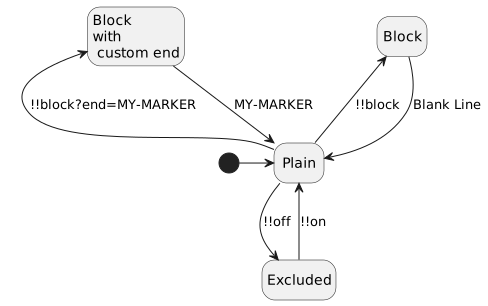
Parsing a Snippet
This is where the meat of the parsing happens.
-
Parsing is defined via the Lexical Layer (via Regexes), a Grammar in EBNF (via an EBNF) and a Parse State Automaton.
-
Then we group and rename parser states into tagged regions to define syntax highlighting.
In case of doubt, the golden corpus at ddot.it/test-data/cases/ shall have the last word.
Lexical Layer
Only the following basic tokens have a special role when parsing ddot.it.
| Token | Name | Comment | Regex |
|---|---|---|---|
WS | Whitespace | TAB or any Unicode space separator — see Spec: what counts as | [\t\p{Zs}] |
NL | Newline | CR, LF, or CR+LF | (\r\n|\r|\n) |
DT | Dot | A single dot | \. |
CM | Comma | A single comma | , |
SC | Semicolon | A single semicolon | ; |
EM | Exclamation Mark | A single exclamation mark | ! |
The syntax of ddot.it is fundamentally based on counting consecutive characters. The main element is the double-dot (..) which is only valid if it is not preceded or followed by another dot. One or three dots are fine and can be used in text as usual, without any special interpretation. Four dots, well, we made that a special case of the empty relation, so that has a defined interpretation. Five dots are fine and mean nothing.
And here we define the counted token sequences.
The lookarounds are what express "neither preceded nor followed by another one of the same character" — the counting rule cannot be written with a quantifier alone. \.{2} on its own would happily match the first two dots of …, which is exactly what Tokenization rule forbids. These are the same forms the Highlight Specification uses, and they are normative. |
| Token | Description | Regex |
|---|---|---|
DT2 | A sequence of 2 consecutive |
|
DT4 | A sequence of 4 consecutive |
|
CM2 | A sequence of 2 consecutive |
|
SC2 | A sequence of 2 consecutive |
|
EM2 | A sequence of 2 consecutive |
|
TX | Any maximal sequence of characters that contains no | (see Tokenization rule) |
Grammar in EBNF
-
Terminals are UPPERCASE
-
Variables are TitleCase
-
?optional,*zero or more,+one or more,|alternative,()grouping -
//comments about the syntax itself. ddot.it has no comments syntax.
-
TextExcept{…}is a shorthand for:-
We have text, that does not start or end with whitespace (
WS). -
We allow all of
(NL | WS | DT2 | DT4 | CM2 | SC2 | EM2 | TX)except those listed in the Except clause. -
E.g.:
TextExcept{CM2,NL} = (DT2 | DT4 | SC2 | EM2 | TX) (WS* (DT2 | DT4 | SC2 | EM2 | TX))*.
-
/* ==========================================================================
   ddot.it — the grammar for parsing one Snippet.

   Notation: the EBNF of the XML 1.0 specification, section 6 "Notation":
       https://www.w3.org/TR/xml/#sec-notation

   Operators used here, all from that notation:
       A ::= B     production            A?          optional
       "lit"       literal string        A*          zero or more
       #xN         character by number   A+          one or more
       [#xN-#xM]   character range       A B         sequence
       (A)         grouping              A | B       alternative
       /* ... star slash  comment        A - B       matches A but not B

   TWO SEMANTIC EXTENSIONS. The notation above fixes the *syntax* of this file;
   two of its operators are read with stronger semantics than XML gives them,
   because the grammar is otherwise ambiguous. Both are specified in the parse
   spec under "Disambiguation":

     1. `|` is an ORDERED choice, as in a PEG: alternatives are tried left to
        right and the first that matches wins.
     2. `?`, `*` and `+` are GREEDY: they consume as much as they can while
        still allowing the rest of the production to match.

   Symbol names follow the parse spec's own convention -- terminals UPPERCASE,
   non-terminals TitleCase -- rather than XML's initial-capital-for-regular-
   expressions rule, so that every name here matches the name used in the
   prose, in the AST diagram and in the parse automaton.
   ========================================================================== */


/* ==========================================================================
   1. TERMINALS

   Restated here so this file stands on its own. The normative definitions,
   including the "maximal run" counting rule, are in the parse spec's
   Lexical Layer; where the two differ, that section wins.
   ========================================================================== */

/* Any Unicode code point. A ddot.it chunk is always UTF-8. */
Char        ::= [#x0-#x10FFFF]

/* TAB plus every character in Unicode general category Zs. Never a newline.
   Zero-width characters (U+200B, U+FEFF) are category Cf and are ordinary text. */
WS          ::= #x9 | #x20 | #xA0 | #x1680 | [#x2000-#x200A]
              | #x202F | #x205F | #x3000

/* Chunk preprocessing has already normalised CR and CR LF to LF. */
NL          ::= #xA

/* A symbol run is one of these tokens only at its special length: the run must
   be neither preceded nor followed by another of the same character. A run of
   any other length -- one dot, three dots, a lone comma -- is TX. That rule is
   contextual and cannot be written in this notation; see the parse spec's
   Tokenization rule. */
DT2         ::= ".."
DT4         ::= "...."
CM2         ::= ",,"
SC2         ::= ";;"
EM2         ::= "!!"

/* Everything else: a run of characters holding no WS, no NL, and none of the
   symbol tokens above. This is where `Node.js`, `U.S.A.` and `...` land. */
TxChar      ::= Char - (WS | NL)
TX          ::= TxChar+ - (TxChar* (DT2 | DT4 | CM2 | SC2 | EM2) TxChar*)


/* ==========================================================================
   2. FIELD TEXT

   Every field of a triple holds the same shape of text: a run of tokens that
   may contain WS between its parts but is not bounded by WS. The fields differ
   only in which token they may not contain, which is written with `-`.
   ========================================================================== */

/* Every token a field is built from, except the WS that may separate them. */
Word        ::= DT2 | DT4 | CM2 | SC2 | EM2 | TX

/* Whitespace-trimmed, at least one token. No field may contain a NL: a triple
   is confined to one logical line. */
Text        ::= Word (WS* Word)*

/* A name stops at the '..' markers that delimit it. */
NameWord    ::= Word - (DT2 | DT4)
Name        ::= NameWord (WS* NameWord)*

/* An object stops at the ',,' that opens the meta part. */
ObjectWord  ::= Word - CM2
ObjectText  ::= ObjectWord (WS* ObjectWord)*

/* An inline meta entry stops at the ';;' that starts the next entry -- the
   object of a pair and a free-text note alike. */
EntryWord   ::= Word - SC2
EntryText   ::= EntryWord (WS* EntryWord)*


/* ==========================================================================
   3. GRAMMAR
   ========================================================================== */

Snippet     ::= Line*

/* Ordered choice: a Line is a Triple if one can be derived, otherwise
   NotATriple. NotATriple is therefore never reachable for text that forms
   a Triple. */
Line        ::= WS* Triple WS* NL
              | NotATriple NL

/* Any run of tokens on one line. Reached only when the Triple alternative
   failed. */
NotATriple  ::= (WS | Word)*

DoubleDot   ::= WS* DT2 WS*

/* The untyped (empty) relation, written '....' or '.. ..'.
   WS+, not WS*: with no WS between, the two DT2 would be four adjacent dots,
   which lexes as DT4 -- that is the first alternative, not the second. */
QuadDot     ::= WS* (DT4 | DT2 WS+ DT2) WS*

Triple      ::= Subject?
                (DoubleDot Relation DoubleDot | QuadDot)
                Object
                WS* Meta?

/* Subject, Relation and MetaRelation are the same production. They keep
   separate names because the AST does. */
Subject     ::= Name
Relation    ::= Name
Object      ::= ObjectText


/* --- meta ---------------------------------------------------------------- */

Meta                ::= CM2 WS* MetaInline WS*
/* the block may be empty: ',,' NL WS* ',,' */
                      | MetaBlockOpen NL (MetaBlock NL)? WS* CM2 WS*

/* The ',,' that opens a block may sit at the end of the triple line, or alone
   on the line *after* it. Both attach the block to the same triple. */
MetaBlockOpen       ::= CM2
                      | NL WS* CM2

MetaRelation        ::= Name


/* --- meta, inline form: entries separated by ';;' ------------------------- */

/* One chain of entries, in any mix: `,, ..k.. v ;; a note ;; .... o` is a
   typed pair, a note, and an untyped pair, in that order.

   An entry may be EMPTY -- `;;` parts entries and demands nothing of them, so
   `,, ;; x` and a line ending in `;;` both derive. An empty entry carries no
   metadata and is dropped: it is not an error, and a separator is not a
   promise that something follows.

   MetaInline itself is never empty, though, which is what keeps a trailing
   `,,` unambiguous: with no SC2 the single entry must be there, so `,,' NL is
   only ever a MetaBlockOpen. Hence the two alternatives rather than a plain
   `MetaEntryInline? (SC2 MetaEntryInline?)*`. */
MetaInline          ::= MetaEntryInline? (SC2 MetaEntryInline?)+
                      | MetaEntryInline

/* Ordered choice: the two dotted forms are tried first, and text is what is
   left. So a '..' that never closes is a note, not an error -- `,, ..bla` is
   the note '..bla'. */
MetaEntryInline     ::= MetaTripleInline
                      | MetaTextInline

MetaTripleInline    ::= DoubleDot MetaRelation DoubleDot MetaObjectInline
                      | QuadDot MetaObjectInline

/* Both end at the next ';;' or at the newline. The two productions are the
   same shape and differ only in the role they carry. */
MetaObjectInline    ::= EntryText
MetaTextInline      ::= EntryText


/* --- meta, block form: entries separated by NL ---------------------------- */

/* Pairs and text lines may be mixed freely, in any order. No ';;' is special
   in a block: NL separates the entries, so ';;' is content everywhere. */
MetaBlock           ::= MetaEntryInBlock (NL MetaEntryInBlock)*

MetaEntryInBlock    ::= MetaTripleInBlock
                      | MetaTextBlock

MetaTripleInBlock   ::= DoubleDot MetaRelation DoubleDot MetaObjectInBlock
                      | QuadDot MetaObjectInBlock

MetaObjectInBlock   ::= Text

/* Greedy: ADJACENT text lines are one note, joined by newlines, so a pasted
   paragraph stays one note. A pair line ends the run; the next text line after
   it starts a new note. */
MetaTextBlock       ::= MetaTextBlockLine (NL MetaTextBlockLine)*

/* Any text at all -- MetaEntryInBlock already tried the pair forms, so a
   leading DT2/DT4 that did not form a pair is this line's text, exactly as
   inline. The subtraction is the one restriction: the line may not BEGIN with
   CM2, because a line-initial ',,' closes the block. */
MetaTextBlockLine ::= Text - (CM2 (WS | Word)*)-
Meta text containing
;;? Inside a,,block, newlines separate the entries, so no;;is special anywhere in it (case28-semicolon-in-meta-block). A note or a value that must carry a literal;;is written there, or in a!!block. -
Ordered choice in
MetaEntryInlineandMetaEntryInBlockmeans a malformed pair is a note, not an error:,, ..blahas no closing.., so the dotted alternatives fail and the entry is the note..bla. The text is kept rather than the line destroyed — an unclosed..is a typo, and a typo in the metadata must not take its triple down with it. -
Objectis mandatory and non-empty (TextExceptrequires at least one token):a ..b..with nothing after the closing..is not a Triple. -
Subject?is optional: an omitted subject means continue with the subject of the previous line. -
Textis a whitespace-trimmed sequence; theWSaround and between words is not part of the Subject, Relation, or Object contents. -
QuadDotis the shorthand for an implicit relation:a….banda .. .. bboth meana ..links to.. b. The two spellings are the same operator, not two operators — see10-spaced-untypedand02-untyped-linkin the golden corpus. -
MetaBlockOpenhas two spellings, and they mean the same thing. The block form’s opening,,may end the triple line (04-multiline-meta,14-multiline-meta-text) or stand alone on the next line (09-standalone-comma-block). Only the block form allows the second spelling — the inline form’s,,must stay on the triple line, since what follows it on that same line is the meta. The second spelling is where the grammar would be ambiguous without ordered choice and greedy optionals: a lone,,after a complete triple could equally be that triple’s block opener or aNotATripleline. The two rules settle it:Meta?is greedy, so aMetathat can be derived is derived, and the,,attaches. Two properties keep this from over-reaching:-
MetaBlockOpen's second alternative isNL WS* CM2—WSnever includes a newline. The,,must therefore sit on the line immediately after the triple; a blank line in between breaks the attachment. -
The block form only matches if a closing
,,is also found. A lone,,after a triple with no closing,,derives noMetaat all, so the greedy choice falls through and that line isNotATriple— as is any,,that follows no triple.
-
Abstract Syntax Tree
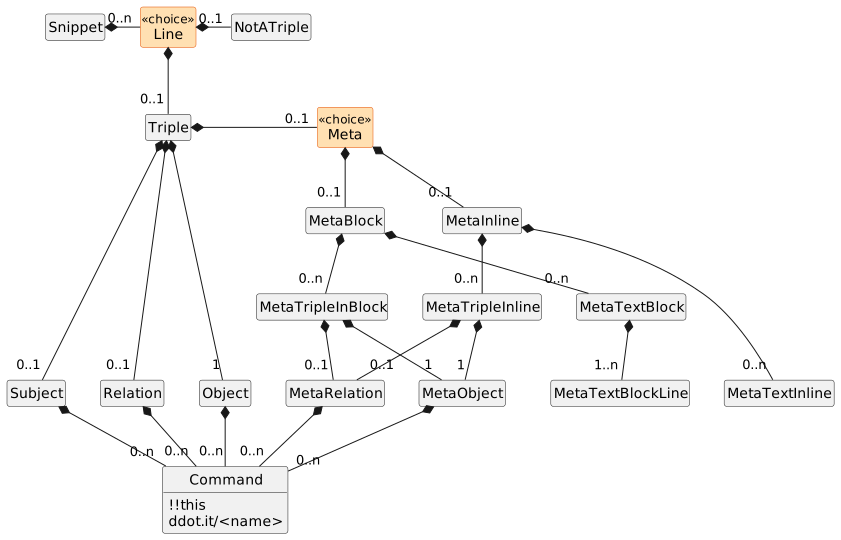
What a parsed ddot.it Snippet looks like as a tree.Every arrow is a contains relation; there are no other relations in this diagram.Orange nodes are exclusive choices: exactly one of their children is present.
-
Lineis either aTripleor aNotATriple.NotATripleis the second alternative of theLineproduction: text that is passed through unparsed. It has no children. -
Subjectis absent when it is continued from the previous Line. -
Relationis absent for theQuadDotshortcut; it then meanslinks to. -
Metais either inline or block, never both. Within one of them, triples and text are not exclusive: both may occur, repeatedly and in any order. Their order is the written one, which is why the event stream is a list and not a map. -
One
MetaTextBlockis one note however many lines it spans; a triple line between two text lines ends the first note and the line after it starts a second. -
MetaObjectunifiesMetaObjectInlineandMetaObjectInBlock: the two differ only in which characters may occur, not in what they mean once parsed. -
MetaTextInlineandMetaTextBlockcarry the built-in relationtext, so in the Information Model they are a Meta like any other. -
A
Commandis a part of the text of the field holding it, not a replacement for it: in!!this ..author.. Johnthe Subject holds one Command, whereas inJohn ..text.. 42no field holds a Command.!!off,!!on, and!!blockare Pre-Parse Commands and never appear as AST nodes. Each in-text command may equally be writtenddot.it/this,http://ddot.it/thisorhttps://ddot.it/this. -
Commands may occur in every field of a Triple and of a Meta alike:
Subject,Relation,Object,MetaRelationandMetaObject.
Parse State Automaton
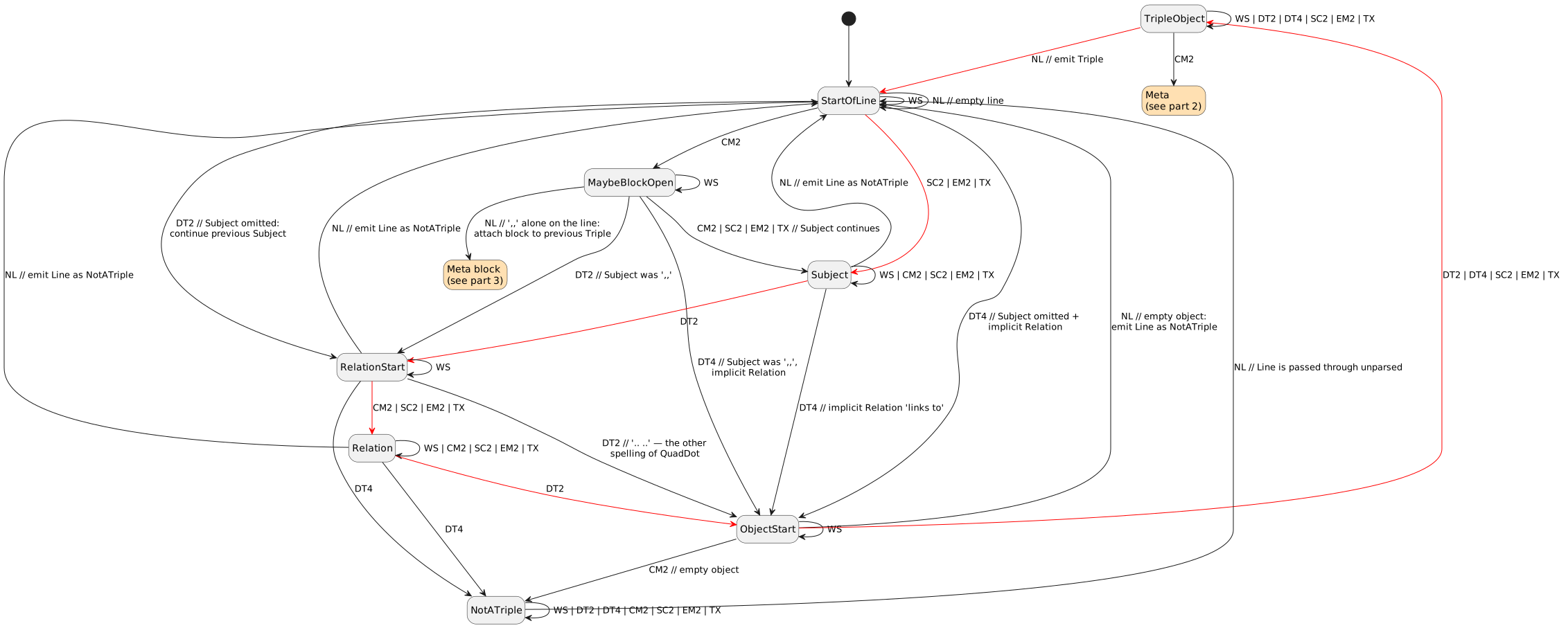
Red arrows indicate the 'happy path': a simple Triple without any Meta.
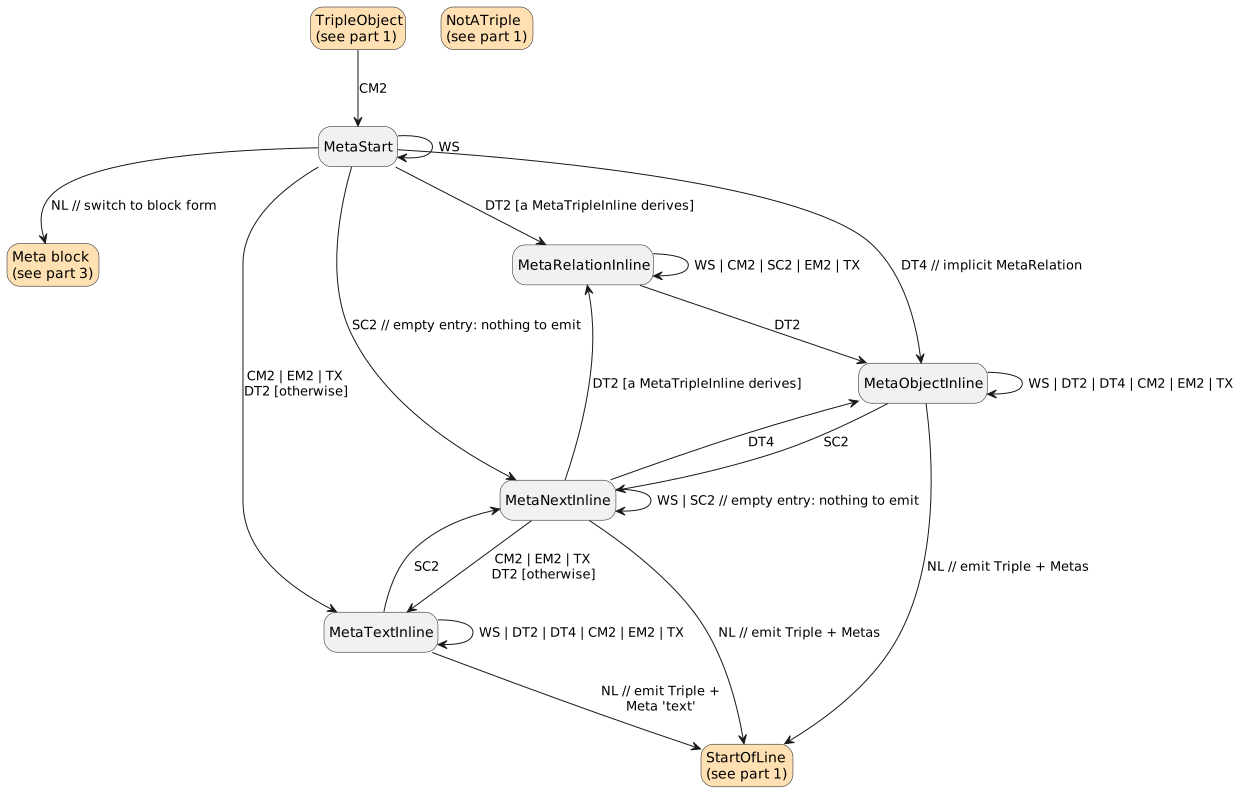
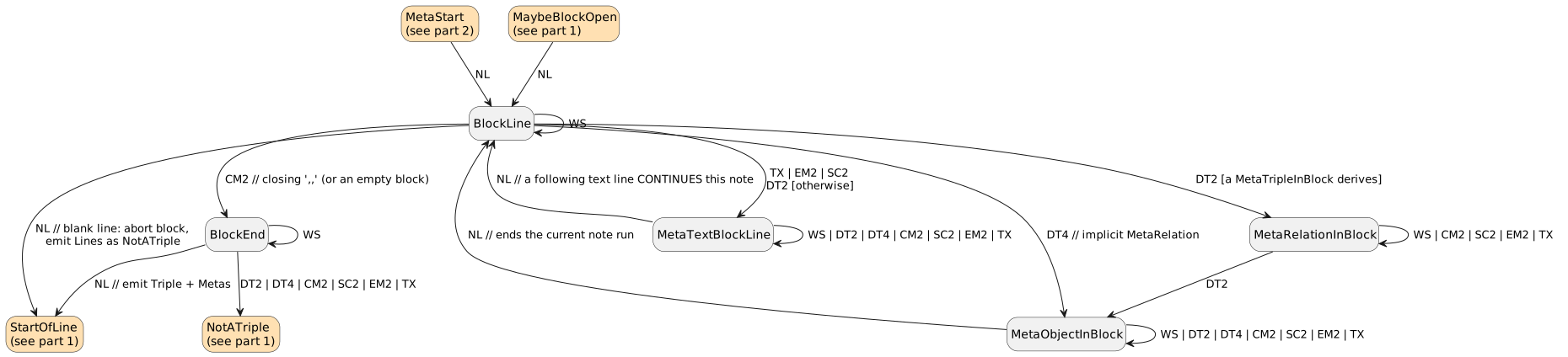
-
StartOfLineis both the start and the accepting state: aSnippetis a sequence ofLine, and eachLineends by returning here. A Triple is emitted on the transition back. -
NotATripleimplements the second alternative ofLine: text that is not a Triple is consumed up to the nextNLand passed through unparsed. -
NLnever entersNotATriple. Every transition consumes its token, so a… -→ NotATriple : NLwould consume the newline and then haveNotATripleeat the following line — one bad line would swallow its innocent successor. A failure detected onNLmeans the line is already over, so those transitions go toStartOfLineand are annotatedemit Line as NotATriple.NotATripleis entered only on a non-NLtoken, where there really is a rest of the line left to consume. -
Where a state fails on
NLinside a,,block, the whole multi-line construct is abandoned and every line it spans is emitted asNotATriple— see Unterminated Constructs for what "abandoned" means operationally. -
The
DT4shortcut skips theRelationstate entirely, sinceQuadDotcarries the implicit relationlinks to. -
The same holds in the meta part:
MetaTripleInline := QuadDot MetaObjectInlineandMetaTripleInBlock := QuadDot MetaObjectInBlockemit the same implicitlinks toas the meta relation — "implicit MetaRelation" in parts 2 and 3 of the automaton means exactly that, and there is no separate meta-only default. See corpus case24-untyped-inline-meta. -
MetaStartis the only place where the inline and the block form are told apart: anNLright after theCM2selects the block form, anything else the inline form. -
A block can also be opened from
StartOfLine, one line later than the triple it belongs to (MetaBlockOpen’s second spelling). `MaybeBlockOpenis the one-token lookahead this needs: a line-initialCM2is a block opener only if anNLfollows it, otherwise it is just the start of aSubjectthat happens to begin with,,. Compare09-standalone-comma-block(opener) with `09’s own first line (an ordinary triple). -
Once meta text has started, a later
DT2is text, not a separator:MetaTextInline’s self-loop carries `DT2/DT4. OnlySC2leaves the state, and it does so unconditionally —MetaTextInlineandMetaObjectInlinehave the same transitions and differ only in the role they emit. -
[a MetaTripleInline derives]/[a MetaTripleInBlock derives]is the ordered choice ofMetaEntryInline/MetaEntryInBlock: a leadingDT2selects the pair states only if the whole pair is there (a closingDT2and a non-empty object). Otherwise the sameDT2starts a note —,, ..blais the note..bla, not a dead line.DT4needs no guard:QuadDot MetaObjectcannot fail once the object is non-empty, and an empty one falls through to text like any other.This is the automaton’s only lookahead, and it is bounded: an entry ends at the next
SC2orNL, so the guard never has to look past one entry. -
An entry may be empty.
SC2parts entries and demands nothing of them, so,, ;; xis an empty entry followed by the notex, and a line ending in;;is its entries followed by a final empty one. An empty entry carries no metadata and is simply dropped: it is not an error, and a separator is not a promise that something follows it. That is whyMetaStart -→ MetaNextInlineandMetaNextInline -→ StartOfLine : NLare ordinary transitions here and not failures — the triple and every entry around the empty one stand. -
Inside a
,,-block, triples and text mix freely, so every line decides for itself and the three old line states (BlockFirstLine,BlockTripleLine,BlockTextLine) are oneBlockLine. What distinguishes a note from the note above it is only what lies between them: adjacentMetaTextBlockLines are oneMetaTextBlock, and a triple line ends the run. -
Two adjacent notes are therefore not writable in a block — the lines fold into one. This is the price of keeping a pasted paragraph intact, and the inline form writes them apart when that is what is meant:
,, one ;; twois two notes. -
The closing
CM2is recognised only at the start of a line, after optionalWS, fromBlockLine. ACM2anywhere else in a block line is content. -
A block may be empty: reaching the closing
CM2straight from the firstBlockLinegives,,NLWS*,,with no Meta at all. -
The object must hold at least one token.
ObjectStartskips leadingWS; anNLorCM2before any object token makes the line aNotATriple, matching the mandatoryObjectin the grammar. -
SC2(;;) is plain text everywhere in the triple line (Subject,RelationStart,Relation,ObjectStart,TripleObject,NotATriple). It becomes a separator only in the inline,,meta form (part 2), where it divides the entries about one triple — after an object and inside a note alike, with no condition on what follows it. In the block meta form (part 3) newlines do that job and;;is content everywhere, which is what makes the block the escape hatch for a note or value that has to carry one (28-semicolon-in-meta-block).
Unterminated Constructs
A ,, block needs a closing ,,, and a !!block needs its terminator (a blank line, or the ?end= marker). What happens when the closing token never arrives has to be stated once, because parsing and highlighting answer it differently and both answers are correct for what they do.
Only the parse result is normative for the triples a tool extracts. The divergence is confined to presentation, and is visible only for input that is malformed to begin with.
References
-
The Pomsky portable regex syntax seems smart